Client Cerberus2.0.1
Publisher Description
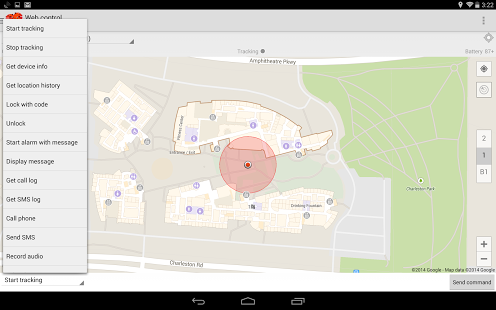
This app lets you easily send commands to a device that has Cerberus installed, helping you recover your misplaced, lost or stolen Android device.
SMS control:
- Enter the phone number or select it from the contacts
- Enter your Cerberus password
- Select the command from a drop-down list
- You can choose to send the command as a normal SMS or a "data" (binary) SMS
Web control:
- All the features you have on the web dashboard (www.cerberusapp.com) with a mobile-friendly interface
- Navigation Mode, starts Maps GPS navigation and automatically updates the destination as your device moves
- Radar Mode, to have an accurate (more than GPS) indication of how near you are to the lost/stolen device measuring the signal level of WiFi hotspot
You can also see the log of SMS/web commands sent and replies received.
SMS commands are sent from your device, so standard text messaging rates apply.
About Client Cerberus
The company that develops Client Cerberus is LSDroid. The latest version released by its developer is 2.0.1. This app was rated by 1 users of our site and has an average rating of 4.0.
To install Client Cerberus on your Android device, just click the green Continue To App button above to start the installation process. The app is listed on our website since 2014-04-30 and was downloaded 313 times. We have already checked if the download link is safe, however for your own protection we recommend that you scan the downloaded app with your antivirus. Your antivirus may detect the Client Cerberus as malware as malware if the download link to com.lsdroid.cerberus.client is broken.
How to install Client Cerberus on your Android device:
- Click on the Continue To App button on our website. This will redirect you to Google Play.
- Once the Client Cerberus is shown in the Google Play listing of your Android device, you can start its download and installation. Tap on the Install button located below the search bar and to the right of the app icon.
- A pop-up window with the permissions required by Client Cerberus will be shown. Click on Accept to continue the process.
- Client Cerberus will be downloaded onto your device, displaying a progress. Once the download completes, the installation will start and you'll get a notification after the installation is finished.
Version History
version 2.0.1
posted on 2014-04-30
version 1.1
posted on 2012-02-01
Several fixes and updates
